
今天小编就带大家来共同学习sourceTree添加及使用SSH密钥?希望可以帮助到有需要的小伙伴哦,下面就是详细完整的操作步骤。

1、打开命令行窗口 Terminal
$ ssh-keygen -t rsa -b 4096 -C "your_email@example.com"
此时在用户目录下生成ssh公钥及对应密钥
~/.ssh/id_rsa 及~/.ssh/id_rsa.pub
如果mac系统是10.12.2及以上,需要更改~/.ssh/config文件配置
Host *
AddKeysToAgent yes
UseKeychain yes
IdentityFile ~/.ssh/id_rsa
3添加本地生成的ssh私钥到ssh-agent
ssh-add -K 本地私钥路径地址
4在你需要clone的系统中,添加用户的ssh公钥
pbcopy < ~/.ssh/id_rsa.pub
复制公钥内容到剪切板中。
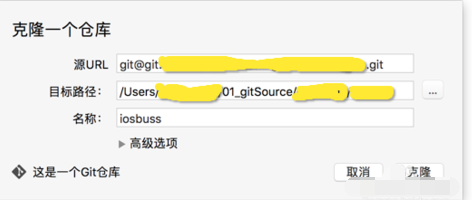
以上就是小编给大家带来的全部内容,大家都学会了吗?
相关下载










相关文章
-
搜狗输入法怎么发表情包?
2024-10-09 15:32:45
-

2024中邮先锋9月6日答案是什么 中邮先锋答题9月6日答案参考
2024-09-06 09:05:26
-
2024中邮先锋8月21日答案是什么 中邮先锋答题8月21日答案参考
2024-08-21 09:02:24
-

2024中邮先锋5月17日答案是什么 中邮先锋答题5月17日答案参考
2024-05-17 09:13:54
-

2024石油党建5月10日答案是什么 石油党建答题5月10日答案参考
2024-05-10 10:25:18
-
2024中邮先锋3月20日答案是什么 中邮先锋答题3月20日答案参考
2024-03-20 11:06:15
-
2024中邮先锋2月20日答案是什么 中邮先锋答题2月20日答案参考
2024-02-20 09:20:52
-
2023中邮先锋12月7日答案是什么 中邮先锋答题12月7日答案参考
2023-12-07 09:14:16
-
2023石油党建11月23日答案是什么 石油党建答题11月23日答案参考
2023-11-23 09:17:48
-
2023石油党建11月8日答案是什么 石油党建答题11月8日答案参考
2023-11-08 09:24:48
